










When Website Forms Work but Emails Do Not
Our clients often ask us the question “My website form is working, but I’m not getting the emails. Is something broken?”
Website forms are located on your site, so it’s logical to assume emails are coming from your site as well. Most of the time, they are not.
The majority of the time, your website form is actually sending a request to an email server through something called SMTP (Simple Mail Transfer Protocol). When it doesn’t work, your form will still probably work fine, but the email will never be sent to your inbox.
Here’s what SMTP is, what’s causing emails from your form to stop working, and how Aspire Digital Solutions can help troubleshoot and solve your email problems so leads do not fall through the cracks.
What SMTP Really Does
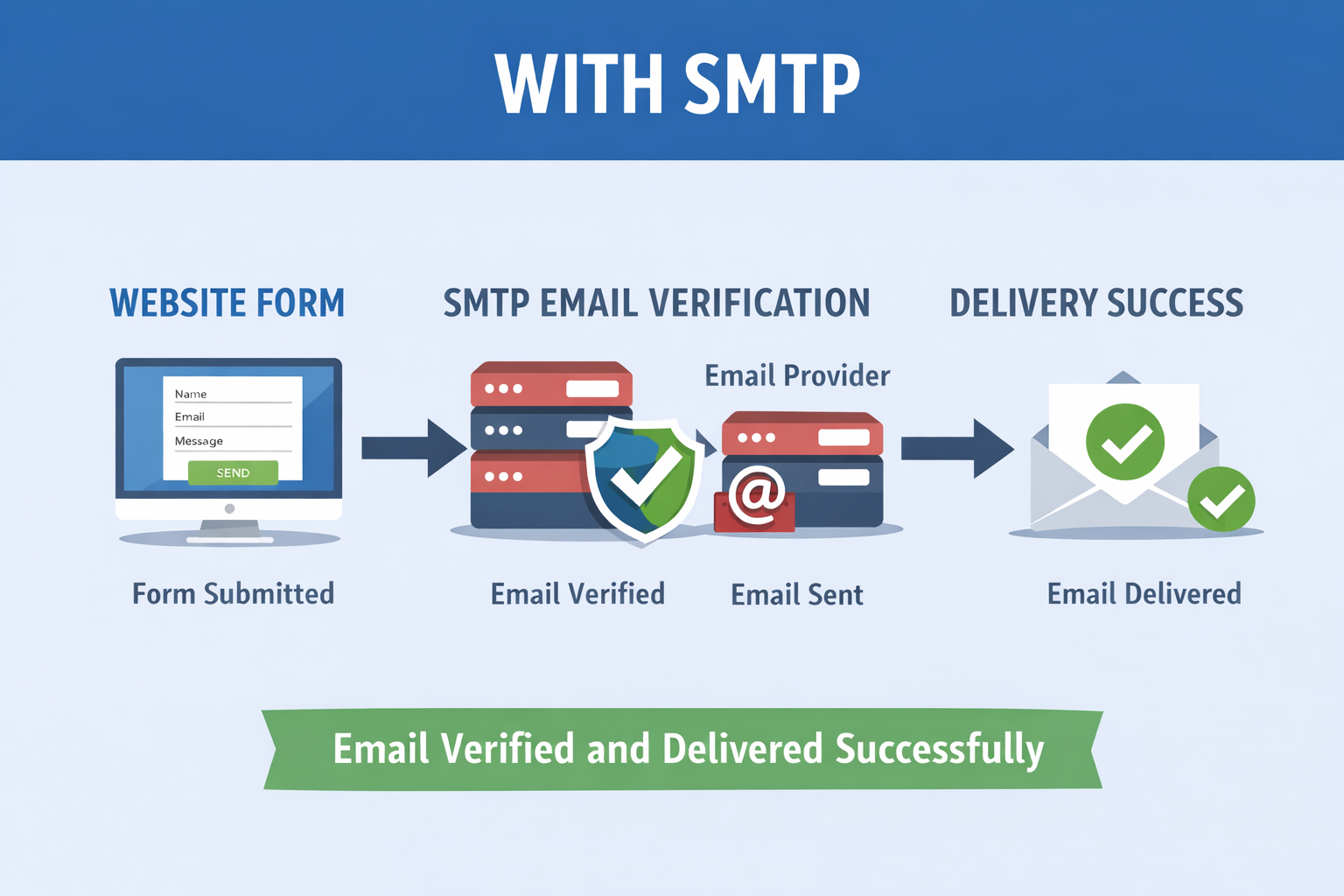
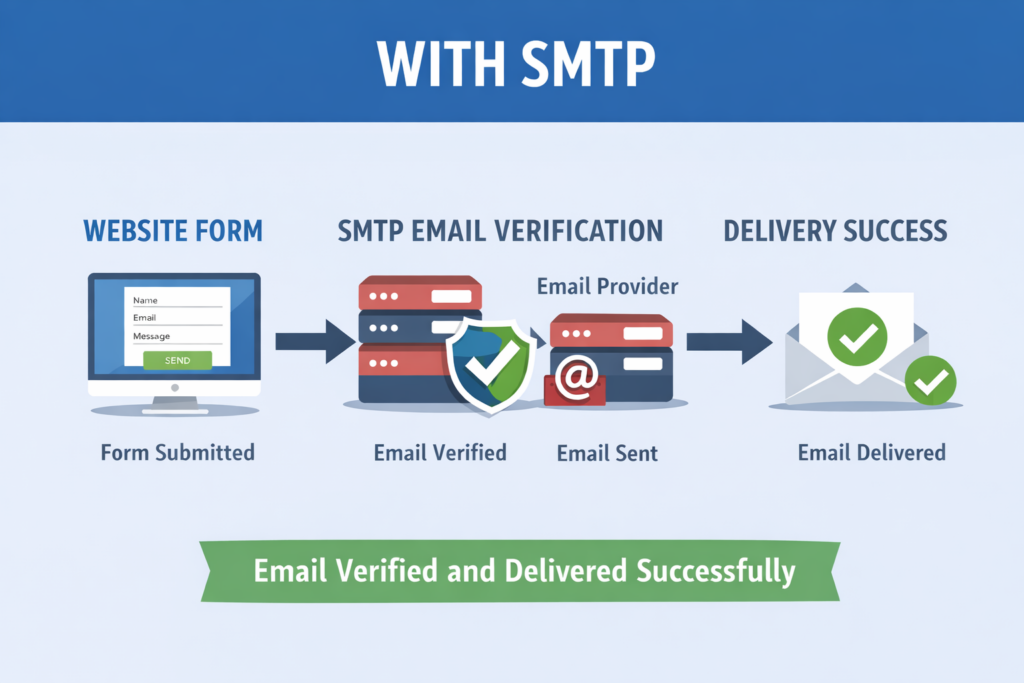
SMTP stands for Simple Mail Transfer Protocol, and in the context of a website form, it is the method used to send the form submission as an email. When someone fills out a contact form and clicks submit, SMTP helps deliver that information from the website’s server to the intended email inbox. It ensures the message is properly sent and received, rather than getting lost or marked as spam.
Your website doesn’t send emails on its own. It merely forwards the email to the email service, which then decides whether to deliver the email, delay it, or block it.
An easy way to think about it:
- Your website collects the message
- SMTP is the delivery method
- The email service decides whether to deliver the email
If the email service doesn’t deliver the email, you won’t ever see the email in your inbox, even though the form worked correctly.
What Aspire Digital Solutions Handles on the Website
Our role is to make sure your website is doing its job properly.
That includes:
- Making sure forms submit successfully
- Confirming users see success or confirmation messages
- Verifying entries are captured inside WordPress
- Ensuring nothing breaks during form submission
When a form submits correctly, the website portion of the process is complete.
What happens next depends on the email system, not the website itself.
Why SMTP Is Managed by IT or the Email Provider
SMTP configuration is not related to your website. This includes:
That includes things like:
- Email authentication
- Server permissions
- Spam and security rules
- DNS records tied to your domain
- Provider specific sending limits and policies
Because of this, SMTP is typically handled by:
- Your internal IT team
- Your managed IT provider
- Your email provider
- In some cases, the client directly
Aspire Digital Solutions does not handle client email systems and does not have access to the client email inbox, server, or email control panel. This is because it is best to maintain access to the email system by IT or the client.
Why Emails Can Stop Working Even If They Worked Before
This is often the most confusing part.
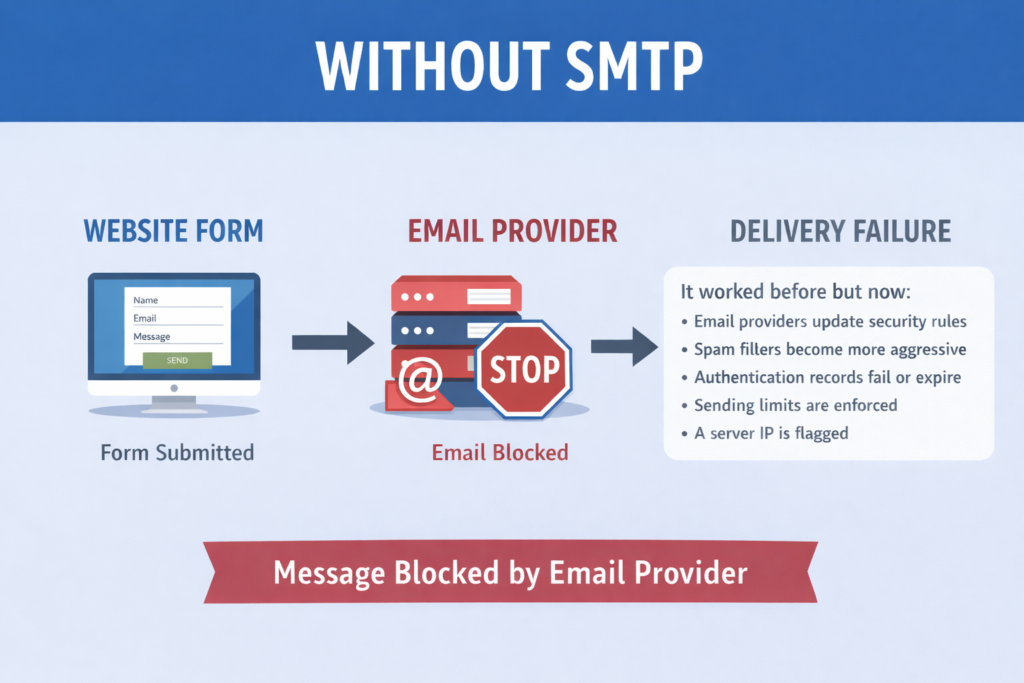
Email delivery can change without anything being touched on the website because:
- Email providers update security rules
- Spam filters become more aggressive
- Authentication records fail or expire
- Sending limits are enforced
- A server IP is flagged
From the outside, it looks like a website problem. In reality, the website sent the message, but the email system did not accept or deliver it.
How Aspire Digital Solutions Helps Bridge the Gap
While we do not manage email systems directly, we do help make sure your website is connected properly.
Our typical approach includes:
- Installing and configuring WP Mail SMTP on your WordPress site
- Connecting the site to a reliable email delivery service
- Using secure API credentials provided by IT or the client
- Sending test emails to confirm the connection is working
This creates a reliable bridge between WordPress and your email provider without requiring us to manage your email accounts.
We are also happy to communicate directly with your IT team on your behalf to explain what is needed and help move things along.
Our Recommended SMTP Services
Based on reliability and ease of use, we commonly recommend:
- SMTP2GO
- SendGrid
These services are designed specifically for application based email sending and work well with WordPress.
The setup and management of these services is performed by IT or the client. Once the credentials are ready, Aspire Digital Solutions integrates the credentials with the website via API and verifies functionality.
The Most Important Thing to Remember
If a form submits but an email does not arrive:
- The website is functioning correctly
- The issue is almost always email delivery or server policy
- SMTP is not a website level setting
- Final delivery is controlled by the email provider
When website and IT teams collaborate, email problems get resolved much faster and with much less angst.
Not Receiving Website Form Emails?
If your website forms are going through but the emails are not appearing, contact us today. We can check to make sure the form is going through on the website and that the information is being recorded in WordPress, and if necessary, set up WP Mail SMTP and integrate it with an SMTP service using your IT department’s or email provider’s credentials. We can also communicate with your IT department to help facilitate the process and get emails flowing again so that leads are not missed.
Frequently Asked Questions
Why am I not getting the email if the website form is working?
Just because the form has worked and the website has done its job does not mean that the email is being delivered. This simply means that the email was filtered out, blocked, or rejected by the email service provider after it left the website.
Has something gone wrong on the website?
No, it is likely that nothing has gone wrong on the website. If you are seeing the success message and the form is logging properly in WordPress, then the website is working as expected. The delivery of the email is not the website’s responsibility.
Why did it work before, and then it stopped working?
Email systems change all the time. The email provider might have changed their security settings, the spam filters might have gotten stricter, the authentication might have expired, the sending limits might have been implemented, or the server IP might have been blacklisted. None of these changes requires the website to be updated.
Can Aspire Digital Solutions help me fix this issue?
We can help you by verifying that the website is working correctly and by setting up the WordPress system to use a reliable SMTP service. We also coordinate with your IT department. We cannot control the email provider.
Why do I need IT involved?
In some cases, SMTP configuration may require access to email account settings, email providers, or account-level permissions. For privacy and security reasons, Aspire Digital Solutions will not have access to client email accounts.
What does Aspire Digital Solutions actually handle in this process?
We will install WP Mail SMTP, integrate it with SMTP services such as SMTP2GO or SendGrid using secure API keys, and test that emails are being sent correctly from the website.
What happens if we do nothing?
The emails may be delayed or blocked altogether. The website may appear to be broken even though it is working correctly, resulting in lost business opportunities.





0 Comments